Unlock HSA

Turn today's medical expenses into tomorrow's tax-free investing power.

Unlock the long-term value of your HSA

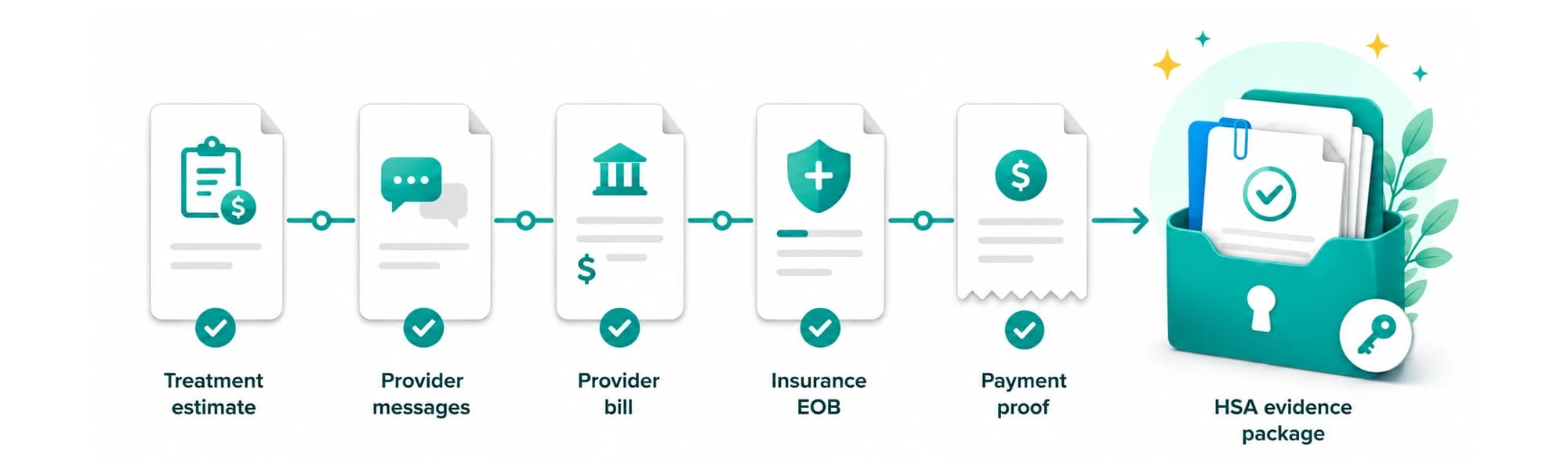
Organize receipts, track unreimbursed qualified medical expenses (incurred after your HSA is established), and keep the records you may need if you take an HSA distribution later.

An HSA can be a powerful long-term savings tool for qualified medical expenses. Unlock HSA helps you keep the documentation, history, and reimbursement trail that many HSA providers may not manage well for long-term users.

  • Portable records
  • Audit-ready history
  • Clear reimbursement trail

Why people take HSAs seriously

An HSA is more than a spending account. For eligible users, HSAs can provide federal tax advantages: tax-deductible or pre-tax contributions, tax-free growth, and tax-free distributions when used for qualified medical expenses. Some people choose to contribute, invest available HSA funds, pay current qualified medical expenses out of pocket, and keep records for possible future reimbursement.

Unlock HSA is designed to help users stay organized if they choose that long-term documentation approach.

Keep qualified expense records organized in one place
Track unreimbursed expenses over time
Know how much documented reimbursement is available
Maintain a cleaner audit trail if you ever need to explain a withdrawal
Preserve future reimbursement options
Portable across HSA providers

How Unlock HSA works

Step 1

Contribute

Contribute to an HSA if you are eligible.

Step 2

Invest

Invest available HSA funds if your custodian permits it.

Step 3

Pay out of pocket

Pay qualified medical expenses out of pocket when appropriate.

Step 4

Save records

Save records sufficient to show (1) the expense was a qualified medical expense, (2) it was not paid or reimbursed from another source, and (3) it was not claimed as an itemized deduction.

Step 5

Reimburse later if needed

If you decide to withdraw later, use your documented records to support the reimbursement.

How reimbursements typically work across HSA providers

Most HSA custodians provide a way to reimburse yourself for qualified medical expenses, but the interface differs by provider. Some use a direct transfer flow, while others route users through a reimbursement request flow.

A single HSA distribution can be supported by one or more previously paid qualified medical expenses if you maintain itemized records and receipts showing the distribution was for qualified medical expenses. Unlock HSA is designed to store the underlying receipt history, expense details, and reimbursement support that users rely on for their own records.

Example: HealthEquity

Some HSA custodians, including HealthEquity, allow reimbursement requests and payment by check or electronic transfer.

You may optionally add a short memo in your custodian portal for your own reference, but keep the full itemized ledger and receipts in your records.

Example grouped reimbursement entry

A grouped reimbursement entry might look like this in practice.

Bulk reimbursement entry

Used when one reimbursement request covers multiple documented qualified medical expenses.

Memo: optional short note for your own reference
Reimbursement date: date of the HSA distribution request
Amount requested: the reimbursement amount
Notes: reference your own itemized ledger and receipts
Payment destination: linked external bank account
For HSAs, the custodian reports distribution totals on Form 1099-SA and does not determine whether a distribution is taxable. You are responsible for maintaining the underlying receipts and records.

Unlock HSA is built to store the real supporting records and receipt history. For many HSA custodians, including HealthEquity, uploading receipts is not required to request an HSA reimbursement, but you should keep receipts in your own files. FSAs and HRAs are different and often require documentation to be submitted.

What the IRS actually sees

Your HSA custodian reports distributions on Form 1099-SA. When you file, you report HSA distributions and qualified medical expenses on Form 8889. You generally do not send receipts with your return, but you must keep records that substantiate qualified medical expenses if asked.

For example, if you withdrew $10,000, the custodian-reported line would conceptually look like this:

Example report line

Form 1099-SA

Gross distribution: $10,000

Typically reported

Distribution amount

This is the key item generally reported by the custodian.

Generally not reported
  • Your receipt images
  • Your detailed expense ledger
  • The family member tied to each expense
  • Your internal reimbursement notes

That reported amount is the key item coming from the custodian. The supporting receipts and documentation remain your responsibility to keep in case you are ever asked to substantiate that the distribution was for qualified medical expenses.

Your records matter more than the vendor portal

Even if you are never asked for receipts, IRS rules require you to keep records sufficient to substantiate that distributions were for qualified medical expenses.

The bigger risks are usually weak documentation, duplicate reimbursement, double-dipping, or mismatches in recordkeeping. Unlock HSA helps users keep organized records, reimbursement history, and supporting documents in one place.

Your HSA custodian generally does not verify whether a distribution is for qualified medical expenses. You are responsible for keeping the records that support tax-free treatment.

You own your documentation

Keep your own supporting records instead of relying on portal memory.

Provider independent

Maintain continuity even if your HSA custodian changes over time.

Bring your own storage

Use connected storage like Google Drive while preserving portability.

Audit-ready trail

Keep receipts, history, and supporting notes easier to substantiate.

Built for real-life reimbursement tracking

Unlock HSA helps users do more than store receipts. It helps organize a long-term reimbursement history that can be difficult to reconstruct years later.

Track unreimbursed qualified medical expenses
Generate audit support packages by year
Bring your own cloud storage (BYOS)

Support a long-term approach

Some users choose to keep HSA funds invested while using Unlock HSA to maintain documentation over time. Unlock HSA helps support that approach by tracking expense history, reimbursement history, and available documented withdrawal capacity.

Illustrative long-term HSA workflowExample chart showing invested HSA balance growth over time and documented reimbursable expenses accumulating over time.Invested HSA balanceDocumented reimbursable expensesYear 0Year 10Year 20Year 30
Illustrative educational example only. This chart is not a performance guarantee or individualized financial advice.

Keep things easier for the future

For users who want flexibility later in life, Unlock HSA makes it easier to identify documented expenses that could support withdrawals during life and helps keep records organized for the people who may one day need to help manage finances.

Clear records can reduce confusion and make financial administration easier for loved ones.

Why Unlock HSA

  • Store and organize supporting records
  • Track unreimbursed qualified medical expenses
  • Plan withdrawals with better visibility
  • Generate audit support packages
  • Maintain a reliable reimbursement history independent of any one HSA provider

Unlock HSA helps you keep the records, history, and audit trail that your HSA custodian usually does not.

Ready to keep your HSA records organized?

Use Unlock HSA as your documentation and workflow layer, independent of any one provider.

Your data stays private

Unlock HSA is designed to help you organize and protect your records. We do not sell your personal information or uploaded document data. You remain in control of your documents, including files stored through connected cloud services such as Google Drive. Your uploaded documents, expense data, and account information are not used to train or fine-tune large language models; they are processed only to provide Unlock HSA features.

FAQ

Does Unlock HSA give tax or financial advice?

No. Unlock HSA provides recordkeeping, workflow, and educational tools. Users are responsible for determining eligibility, contribution limits, and whether expenses qualify under applicable rules.

Will Unlock HSA sell my personal information or use my data to train AI models?

No. Unlock HSA is designed to help you organize and protect your records, not monetize them. We do not sell your personal information or uploaded document data. You remain in control of your documents, including files stored through connected cloud services such as Google Drive. Your uploaded documents, expense data, and account information are not used to train or fine-tune large language models; they are processed only to provide Unlock HSA features.

Do I need to upload receipts to my HSA vendor if I use Unlock HSA?

For many HSA custodians, uploading receipts is not required to request an HSA reimbursement, but you should keep receipts in your own files. FSAs and HRAs are different and often require documentation to be submitted.

Can Unlock HSA help me know how much I may be able to reimburse?

Yes. Unlock HSA is designed to help users track documented unreimbursed expenses and view available reimbursement history more clearly.

Can Unlock HSA work with Google Drive or my own cloud storage?

Yes. Unlock HSA supports storage flexibility, including connected cloud storage you control, such as Google Drive. This helps keep your supporting records organized and portable over time.